Dynamic QR Code Scanner Display (DQR-111) Bluetooth (BLE) Model
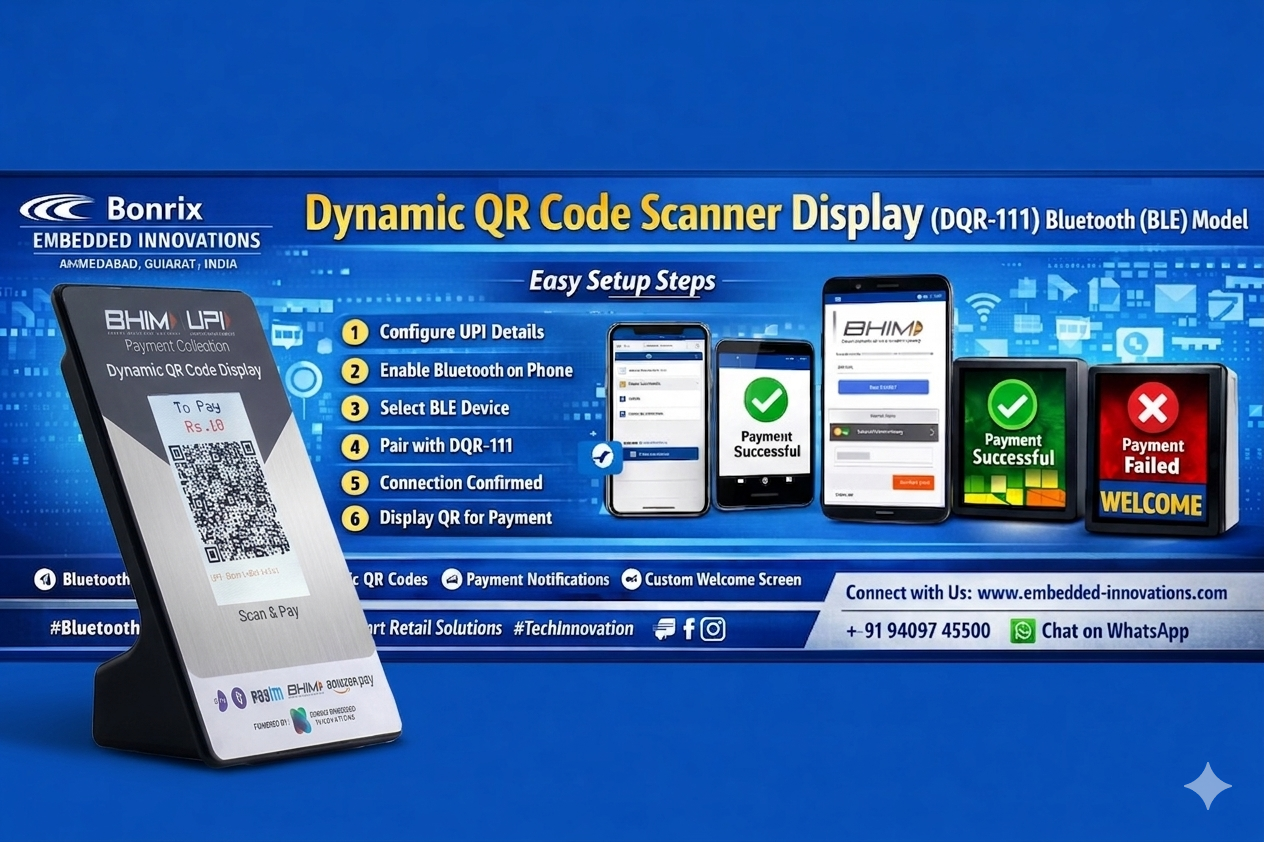
The Dynamic QR Code Scanner Display (DQR-111) is a versatile device designed for displaying dynamic QR codes generated from an Android app. It utilizes Bluetooth Low Energy (BLE) connectivity to seamlessly communicate with your Android device and enhance retail payment experiences.
Features
- Bluetooth Connectivity: Connects wirelessly to Android smartphones or tablets via BLE.
- Dynamic QR Code Display: Displays real-time QR codes generated from your Android app.
- Payment Notifications: Shows payment success and failure notifications instantly.
- Welcome Screen: Customize branding or welcome messages on the display.
Setup Steps
-
App Configuration:
Open your Android app and configure BHIM UPI details such as VPA (Virtual Payment Address) and VPN settings.
Ensure dynamic QR code generation is enabled. -
Enable Bluetooth:
Turn on Bluetooth on your Android device to initiate communication. -
BLE Selection:
Navigate to Bluetooth settings in the app and select Bluetooth Low Energy (BLE). -
Device Pairing:
Scan for nearby devices and select DQR-111 from the list. -
Connection Notification:
Once connected, the device will display a connection confirmation on screen. -
Generate QR Codes:
Use the app to generate QR codes with specific payment amounts, which will be displayed for customers. -
Payment Status & Welcome Screen:
Customize screens for payment success, failure, and welcome branding.
Learn More
For more details, visit:
www.embedded-innovations.com
Follow on Facebook: Bonrix Embedded Innovations
Company Details
Company: Bonrix Embedded Innovations
Location: Ahmedabad, Gujarat (India)
Email: info@embedded-innovations.com
Mobile: +91-9409745500
WhatsApp:
Chat on WhatsApp
Tags
#TechInnovation #DynamicQRDisplay #BLE #BluetoothLowEnergy #Fintech #UPIPayments #SeamlessTransactions #AndroidApp #SmartPayments #DigitalPayments #ContactlessPayments #TechSolutions #BonrixEmbeddedInnovations #Innovation #FuturePayments #EasyTransactions #SmartDevices #TechTrends #CashlessSociety #BHIMUPI #UPI #PaymentGateway #ModernPayments #SecurePayments #ConnectedDevices #TechWorld
#DynamicQRCode #WiFiDisplay #JPEGDisplay #SmartDisplay #TechGadgets #IoTDevices #WirelessDisplay #EmbeddedSystems #AndroidApp #DesktopApp #APIIntegration #HighResolutionDisplay #SmartTech #PortableDisplay #DisplayTechnology #DigitalSignage #SmartDevice #WiFiTechnology #RetailTech #DigitalTransformation #EfficientRetail #RetailAutomation #WirelessIntegration
#payswiff #scanandpay #paytm #Payloud #GPay #PhonePe #bharatpe #cashfree #razorpay
#InnovativeDisplays #RetailTech #MakeInIndia #DynamicQRDisplay #RetailPayments #Innovation #digitalpayments #bhim #npci #UPI #upipayment #soundbox #PaymentSoundbox #upisoundbox #qrcode #cloudspeaker #Fintech #payments #QRpayment #paymentspeaker #QRScreen #PoleDisplay #DisplayPole #CustomerDisplay #POS #Retail #billingsoftware #posterminal #DigitalPayments
#NPCI #icicibank #icici #RetailTech #UPIPayments #SmartRetail #QRCode #DigitalTransformation #RetailSolutions #BillingSoftware
#UPI #DigitalTransformation #DigitalIndia #QRPayments #Banking #FintechInnovation #PhonePe